Best Forex Brokers Review


Best Forex Trading Platforms 2026

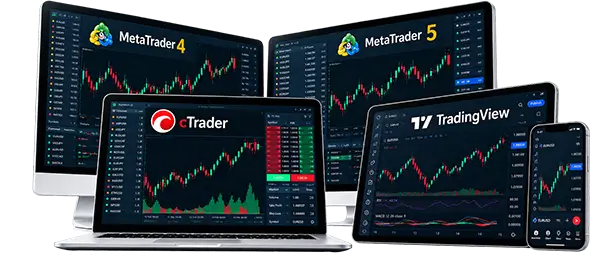
Every trading platform promises the same thing: better charts, faster execution, an edge over the next trader. In practice, the right choice depends on how you trade. MT4 still runs the largest Expert Advisor ecosystem in the industry. MT5 handles more asset classes and tests strategies faster. cTrader gives manual traders a cleaner order screen and real depth-of-market data. TradingView keeps chart-first traders in one browser tab. This guide compares the best forex trading platforms available now, then shows which brokers support each one, because platform choice and broker choice aren’t the same decision.

sangram mohanta

Written by

Sangram Mohanta

rex john walsh

Fact checked by

Rex John Walsh

Forex Trading Platforms
Forex and CFD trading carry real risk, and leverage magnifies it in both directions. A good platform sharpens analysis and execution, but it can’t remove that risk. Check a broker’s regulation, fee structure, platform availability, and risk disclosures before funding any live account.
MetaTrader 4 Brokers

MetaTrader 4

MetaTrader 5 Brokers

MetaTrader 5

cTrader Brokers

cTrader

TradingView Brokers

TradingView

Quick Answer: Best Forex Trading Platforms by Trader Type

✓

There’s no single best answer here. MT4 remains the strongest fit for forex-focused traders leaning on Expert Advisors. MT5 usually works better once you’re trading indices, stocks, or commodities alongside currency pairs. cTrader can be useful for scalpers who want a cleaner order-entry screen and genuine depth-of-market data. TradingView is strongest for traders who live and die by their charts.

Trader Type Best Platform Fit Why
Beginner MT5 or broker web platform Easier multi-asset access, modern interface
Forex-only trader MT4 Large community and EA support
Multi-asset trader MT5 Forex, stocks, indices and CFDs in one terminal
Scalper cTrader Clean interface, fast order tools, depth of market
Chart-focused trader TradingView Advanced charting and watchlists
Algorithmic trader MT4 or MT5 Expert Advisors and strategy testing
Mobile trader MT5 or broker app Mobile quality depends on broker support

For broker-specific rankings, see our guides to the best MT4 brokers and best MT5 brokers.

Best Forex Brokers for 2026: Quick Comparison

✓

Welcome to FP Markets
Best Forex & CFD Trading Provider
Minimum Deposit $100
No Deposit Bonus.
5.0 rating
5.0
Location: Australia
Welcome to IC Markets
True ECN Forex Broker
Minimum Deposit $200
No Deposit Bonus
5.0 rating
5.0
Location: NSW, Australia.
Welcome to FxPro
Trade Like a Pro
Minimum Deposit $100
No Deposit Bonus.
4.5 rating
4.5
Location: Basinghall, England.
Welcome to FBS Markets
Reliable Forex Broker
Minimum Deposit $1.00
100% Deposit Bonus
4.5 rating
4.5
Location: Belize, C.A
Welcome to Axi
Trade with a Trusted Broker
Minimum Deposit $10
No Deposit Bonus.
4.5 rating
4.5
Location: Sydney, Australia.
Welcome to HFM
World Leader in Financial Trading
Minimum Deposit $100
100% Deposit Bonus.
4.0 rating
4.0
Location: Beachmont, Kingstown.

Forex Trading Platform Comparison: MT4 vs MT5 vs cTrader vs TradingView

✓

No platform is best for everyone. This forex trading platform comparison breaks down how each one actually differs. MT4 may suit traders who rely on Expert Advisors and a familiar layout. MT5 is usually better for multi-asset traders who want more instruments in one place. cTrader can be useful for active manual traders who prefer transparent execution. TradingView is strongest for chart-focused traders who want serious analysis tools without installing anything.

Platform Best For Charting Automation Copy Trading Main Limitation
MT4 Forex-focused traders, EAs 30+ built-in indicators Expert Advisors (MQL4) Third-party / signal services Older interface, forex-centric
MT5 Multi-asset traders More timeframes, built-in calendar Expert Advisors (MQL5) Native MQL5 Signals Some MT4 EAs don't transfer
cTrader Scalpers, manual traders 70+ indicators, 3 DOM views cTrader Automate (C#) cTrader Copy Not offered by every broker
TradingView Chart-focused traders Best-in-class, community scripts Pine Script alerts/strategies Depends on broker Direct execution still broker-specific

How We Compared Forex Trading Platforms

✓

There’s no single best answer here. MT4 remains the strongest fit for forex-focused traders leaning on Expert Advisors. MT5 usually works better once you’re trading indices, stocks, or commodities alongside currency pairs. cTrader can be useful for scalpers who want a cleaner order-entry screen and genuine depth-of-market data. TradingView is strongest for traders who live and die by their charts.

Testing Factor What to Check Why It Matters
Charting tools Timeframes, indicators, drawing tools Supports technical analysis
Order execution Market, limit, stop, trailing stop, one-click Affects speed and control
Platform stability Freezing, crashes, server performance Matters most in volatile sessions
Automation EAs, bots, strategy testing Central for algorithmic traders
Cost transparency Spread, commission, swaps shown clearly Helps estimate real trading cost

MetaTrader 4: Best for Forex-Focused Traders and Expert Advisors

✓

MT5 arrived in 2010 as MetaQuotes’ answer to a simple problem: MT4 was built for forex, and traders wanted more. MT5 runs on 64-bit architecture, supports both netting and hedging, and ships with 21 timeframes against MT4’s nine. It also bakes in an economic calendar and a faster strategy tester, two things MT4 users have long patched in with third-party tools. MT4 vs MT5 usually comes down to one question: do you need more than forex? If yes, MT5 wins by default.

Who MT4 Is Best For

MT4 Strengths

MT4 Limitations

MetaTrader 5: Best for Multi-Asset Forex and CFD Traders

✓

MT5 arrived in 2010 as MetaQuotes’ answer to a simple problem: MT4 was built for forex, and traders wanted more. MT5 runs on 64-bit architecture, supports both netting and hedging, and ships with 21 timeframes against MT4’s nine. It also bakes in an economic calendar and a faster strategy tester, two things MT4 users have long patched in with third-party tools. MT4 vs MT5 usually comes down to one question: do you need more than forex? If yes, MT5 wins by default.

Who MT5 Is Best For

MT5 Strengths

MT5 Limitations

cTrader: Best for Active Manual Traders and Scalpers

✓

cTrader comes from Spotware rather than MetaQuotes, and it shows the moment you open a chart. The platform ships with more than 70 built-in indicators against MT4’s roughly 30, and its Depth of Market panel actually has three separate views: Standard, a price ladder, and VWAP, which shows the volume-weighted average price across different order sizes. That’s a level of order-flow detail MT4 has never offered for forex. Automated trading runs through cTrader Automate, built on C# rather than MQL4, and cTrader Copy handles social trading natively.

Who cTrader Is Best For

cTrader Strengths

cTrader Limitations

TradingView: Best for Chart-Focused Forex Traders

✓

TradingView built its reputation as a charting tool traders kept open in a separate tab while executing trades somewhere else. That’s starting to change. IC Markets, for one, now lets clients execute trades directly from TradingView charts through its cTrader Raw account, no switching platforms to place the order. It’s still the exception rather than the rule; most TradingView forex brokers searches turn up brokers offering charting access only, with execution still routed through MT4, MT5, or cTrader.

Who TradingView Is Best For

TradingView Strengths

TradingView Limitations

Broker Proprietary Platforms: When Are They Worth Using?

✓

Some brokers build their own platforms instead of, or alongside, MT4, MT5 and cTrader, such as FxPro Edge, the HFM App, FBS Trader, and FP Markets’ Iress suite. These tend to prioritise easier account management and simplified order placement over raw analytical power. That makes them a reasonable starting point for beginners, but advanced traders should still compare charting depth, order types, and pricing transparency against MT4 or MT5 first.

How We Evaluate Broker Safety

Best Forex Trading Platform by Trading Style

✓

A scalper shouldn’t pick a platform because it looks modern any more than a beginner should pick one because it’s popular. Spread, commission, execution speed, and broker server quality matter just as much as the interface in front of you.
Trading Style Best Platform Fit What to Check
Beginner MT5 or broker web platform Education, demo quality, risk tools
Scalper cTrader or MT4 Spreads, commission, execution
Algo trader MT4 or MT5 VPS, EA support, execution
Chart trader TradingView Broker integration
Mobile trader MT5 or broker app App stability, alerts
Copy trader Broker copy platform or cTrader Copy Risk controls, trader history
Multi-asset trader MT5 Available CFDs and fees

Which Brokers Support MT4, MT5, cTrader and TradingView?

✓

Platform support varies more than most traders expect, even among well-known brokers. FP Markets and IC Markets both run close to the full MT4/MT5/cTrader/TradingView lineup, though TradingView access comes through a specific account type rather than every account. Axi has stayed MT4-first for years and only recently extended MT5 access through its funded-trader programme, not a full retail rollout. TabTrade skipped MT4 entirely, launching in 2025 with MT5, cTrader and TradingView from day one. Always confirm current availability on the broker’s own platform page before opening an account.

Broker MT4 MT5 cTrader TradingView Proprietary Best Platform Option
FP Markets Yes Yes Yes Yes (RAW) Iress (AU) cTrader or TradingView
IC Markets Yes Yes Yes Yes (direct exec.) None TradingView for chart + execution
FxPro Yes Yes Yes No FxPro Edge FxPro Edge or cTrader
TabTrade No Yes Yes Yes None MT5 or cTrader
Axi Yes Limited No No Axi Trading Platform MT4 for EA trading
HFM Yes Yes No No HFM App MT5 for broader access
FBS Yes Yes No Charts only FBS Trader MT5 or FBS Trader

Best Forex Trading Platforms for Mobile Trading

✓

Mobile quality varies as much between brokers as full desktop platforms do. A stable app matters more during a news release than any indicator ever will. Check login speed and biometric support, chart readability on a small screen, whether price alerts actually fire in time, and how cleanly stop-loss and take-profit orders place from a phone. FBS now embeds TradingView-powered charts directly inside its own best forex trading app, rather than making users switch platforms just to see decent charts.

Mobile Feature Why It Matters What to Check
Fast login Matters during active markets Biometric login, session stability
Clear charts Needed for analysis on the go Indicators, drawing tools, timeframes
Alerts Helps monitor open trades Price alerts, push notifications
Order placement Reduces mistakes under pressure Buy/sell, stop-loss, take-profit
Stability Critical during news events App crashes, server issues

Best Platforms for Automated Forex Trading

✓

Every major platform here supports some form of automation, but the tools underneath differ. MT4 runs Expert Advisors written in MQL4 and still has the largest EA marketplace anywhere. MT5 uses MQL5, a more modern language, paired with a faster strategy tester. cTrader Automate builds bots in C#, giving access to the full .NET framework at the cost of a steeper learning curve. An automated forex trading platform is only as good as the VPS running it; a strategy that backtests beautifully can still fail live once spreads and slippage enter the picture.

Platform Automation Strength
MT4 Largest EA ecosystem, custom MQL4 indicators
MT5 Faster strategy testing, modern MQL5 environment
cTrader cTrader Automate (C#) bots
TradingView Strategy scripts and alerts, execution varies by broker

Copy Trading and Social Trading Platforms

✓

Copy trading and social trading get used interchangeably, but they’re not the same thing. Copy trading automatically mirrors a specific trader’s positions into your account for a fixed fee. Social trading is broader: following strategies or community sentiment without auto-copying every trade. MT4 and MT5 support this natively through MQL5 Signals, and cTrader has its own Copy feature. Check drawdown history before subscribing to anyone, not just headline returns; a trader up 40% with a 60% drawdown took on far more risk than the number suggests. Fees and copy ratio matter too, and past performance guarantees nothing.
See copy trading brokers and social trading brokers.

Forex Trading Platforms

Do Forex Trading Platforms Affect Trading Costs?

The platform itself is usually free. What isn't free is the broker's pricing model underneath it, and that's where the real cost of trading lives. Spreads, commissions, swap rates, and inactivity fees all vary by account type, and the same platform can feel cheap at one broker and expensive at another. VPS and data fees are worth checking too, since they rarely show up until after the account is open.

Cost Factor Why It Matters What to Check
Spread Affects every single trade Typical spread on major pairs
Commission Central to raw-spread accounts Cost per lot
Swap fee Affects overnight positions Long/short swap rates
VPS fee Matters for EA traders Free or paid conditions

Platform Safety, Broker Regulation and Risk Controls

✓

A good platform doesn’t make an unregulated broker safe, and that point is worth repeating. Check the broker’s actual regulator and legal entity, not just a logo on the homepage; FCA, ASIC, and CySEC oversight looks very different from an offshore registration with no real enforcement behind it. Beyond regulation, look for two-factor authentication, negative balance protection, clear margin alerts, and withdrawal controls that don’t quietly change after the account is funded.

A trading platform is only a tool. Broker regulation, account terms, execution quality, and risk controls determine how safe the trading environment actually is.


See regulated forex brokers, FCA-regulated forex brokers, and ASIC-regulated forex brokers.

Secure Fintech Trading Dashboard

Mistakes to Avoid When Choosing a Forex Trading Platform

The most common mistake is choosing a platform because it's popular rather than because it fits how you actually trade. Close behind it: ignoring broker execution quality, since identical software performs differently depending on who's routing your orders. MT4 may be excellent for Expert Advisors, but it's not the right fit for someone who wants forex, stocks, indices, and commodities under one login; MT5 usually makes more sense there.

Choosing cTrader or TradingView without confirming broker support, skipping past spreads and commission, and running automation without testing round out the list, along with high leverage and no real risk controls.


Forex Trading Platform Checklist Before Opening an Account

Run through this before funding a live account. It takes two minutes and it will save you from most of the mistakes above.

Best Forex Broker Ratings & Comparison

Compare ratings, platform quality, and key features to find the best broker for your trading needs.

IG

☆ Overall Rating 5.0/5
▣ Mobile Trading ★★★★★
◇ Trading Fees ★★★★★
♧
SpotlightNo promotion is available at this time.
View Broker →

FP Markets

☆ Overall Rating 5.0/5
▣ Mobile Trading ★★★★★
◇ Trading Fees ★★★★★
♧
SpotlightRaw spreads, strong platform choice.
View Broker →

IC Markets

☆ Overall Rating 4.9/5
▣ Mobile Trading ★★★★★
◇ Trading Fees ★★★★☆
♧
SpotlightTight spreads and fast execution.
View Broker →

FxPro

☆ Overall Rating 4.5/5
▣ Mobile Trading ★★★★☆
◇ Trading Fees ★★★★☆
♧
SpotlightMulti-platform access and established brand.
View Broker →
♢ Trading CFDs involves risk. Retail investor accounts may lose money.

FAQs About Forex Trading Platforms

✓

It depends on your style. MT4 suits forex-focused automation, MT5 fits multi-asset trading, cTrader suits active manual traders, and TradingView suits chart-first traders.
MT4 wins on Expert Advisor variety and broker familiarity. MT5 wins on asset range, timeframes, and built-in tools. Neither has fully replaced the other yet.
For active manual traders who want depth-of-market data, often yes. For EA-driven traders, MT4’s ecosystem is still hard to beat.
Sometimes. IC Markets supports direct execution from TradingView charts via its cTrader Raw account. Most brokers still treat TradingView as charting only.
MT5 or a broker’s own web platform, mainly for easier navigation. Education quality, demo accounts, and regulation matter just as much as the platform.
cTrader, MT4, and MT5 all get compared here, since order speed and commission matter more than the interface. Broker execution quality decides more than platform choice.
Most brokers offer MT4, MT5, cTrader, or a web platform free. Trading costs still apply through spreads, commissions, and swaps either way.
It can be, with secure login, a stable connection, active alerts, and stop-loss orders in place. A mobile app should support risk management, not replace it.

Final Verdict: Which Forex Trading Platform Should You Use?

✓

There isn’t one correct answer here. MT4 still makes sense for forex-focused automation. MT5 is the better call once you’re trading multiple asset classes. cTrader suits active manual traders who want transparent execution and real market depth. TradingView earns its place for anyone who thinks in charts first. Before opening a live account, weigh platform tools against broker regulation, spreads, commission, and execution conditions. The platform is the tool. The broker determines whether the experience holds up once real money is on the line.

Top Rated Online Best Forex Brokers 2026

FP Markets Review
5.0 rating
Global Forex & CFD broker with spreads from 0.0 pips, 10,000+ CFDs and 24/7 support.
Location: Australia
IC Markets Review
5.0 rating
Raw-spread Forex & CFD broker
focused on low-cost, fast-execution trading.
Location: NSW, Australia.
FxPro Review
4.5 rating
Multi-asset CFD broker offering 2,100+ instruments and multiple trading platforms.
Location: Basinghall, England.
Top Forex Brokers Review